Professional Product family

Professional-grade
UFS Explorer software

Two editions designed for data recovery engineers and digital forensics investigators who need precise control when handling complex, encrypted, RAID-based or enterprise storage systems. Both are built on the same recovery engine but differ in their specialized capabilities. Choose the edition that best fits your professional requirements.

For data recovery specialists Thales Sentinel protected Free trial included
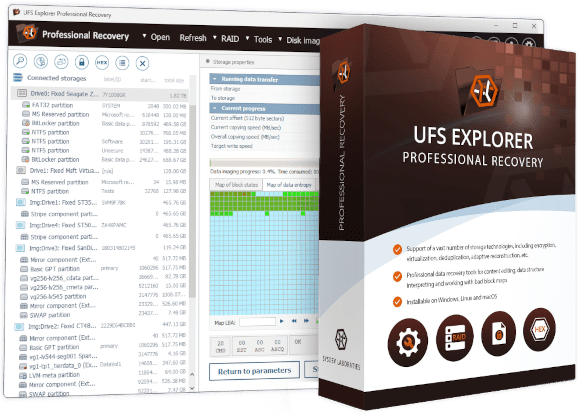
UFS Explorer Professional Recovery
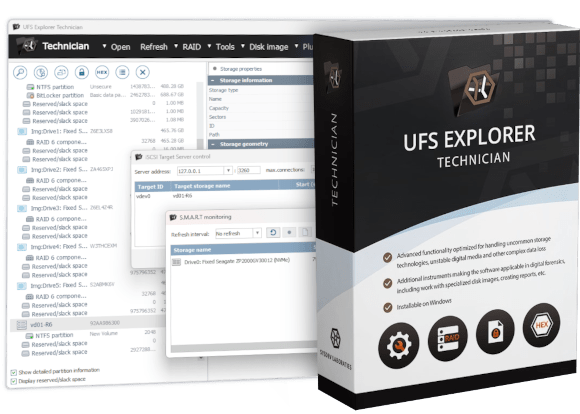
UFS Explorer Technician
Two editions

Choose the product that suits your workflow

Both editions are tailored for specialist use. The choice mainly depends on three factors: the licensing model preferred by your organization, whether macOS support is required, and whether your work involves enterprise SAN environments or Unix file systems, which are supported only in UFS Explorer Technician.

UFS Explorer Professional Recovery
Advanced toolkit for recovery professionals, with a perpetual license covering all operating systems
  • Full RAID engine, support for VMFS, major encryption technologies, hex editor, E01/AFF4 forensic images
  • SAN recovery via external data maps (RAID 5/6/10)
  • Windows, macOS and Linux – one perpetual license for all platforms
  • Thales Sentinel SL or HL dongle activation
  • Corporate and commercial licensing available
License Perpetual
Platforms Windows · macOS · Linux
from $699.95 Commercial license · Perpetual
UFS Explorer Technician
Maximum capability edition
UFS Explorer Technician
The most comprehensive UFS Explorer edition, which adds enterprise Unix support, SAN plugins and hardware-level tools
  • Includes everything from UFS Explorer Professional Recovery
  • Read access to QZFS, WAFL, AIX JFS, VxFS, EAFS/HTFS and NxFS
  • Six optional SAN plugins for Dell, HP and IBM systems
  • Raw SCSI/ATA commands, SCSI Commander, non-standard sector imaging
  • Extended forensic reporting with file hash verification
License Limited-term (3 months – 5 years)
Platforms Windows · Linux
from $469.95 Commercial license · Limited-term
Shared functionality

Features included in both editions

The capabilities listed below are identical in UFS Explorer Professional Recovery and Technician. The only difference is the additional functionality that Technician provides on top of this shared core.

Support for all major file systems: FAT/exFAT, NTFS, ReFS (including deduplication), APFS, HFS+, Ext2/3/4, XFS, Btrfs, F2FS, ZFS, UFS, JFS, ReiserFS
Direct access to VMware VMFS and VMFS6 datastores without prior extraction of virtual disks
Read access for Novell NSS/NWFS, HPFS and HFS file systems
Comprehensive encryption support: LUKS/LUKS2, FileVault 2, VeraCrypt, eCryptFS, BitLocker, APFS encryption, WD bridge chip decryption (JMS561, Symwave, Initio, Oxford)
Full RAID engine with automatic and manual RAID assembly, supporting DDF1, DDF2, mdadm, LVM/LVM2, Storage Spaces, Apple RAID, Fusion Drive (APFS/Core Storage), BeyondRAID, SHR, RAID-F1 and RAID-Z
Reverse RAID decomposition for splitting assembled arrays into individual components
SAN recovery via external data maps for degraded RAID 5/10 and double-degraded RAID 6/60
Support for major virtual disk and forensic image formats: VMDK, VHD/VHDX, QCOW2, VDI, Parallels, DMG, sparsebundle, E01/Ex01 and AFF4
Advanced disk imaging: configurable passes, on-demand (read-once) mode, entropy map generation, file-system-map-based imaging, DeepSpar DDI and MRT Data Explorer integration
Integrated hex editor with data interpreter, field highlighting, parity calculator, XOR operations, storage comparison, reverse address translation and parallel search
iSCSI target (server) and initiator (client) for sharing and accessing volumes over a local network
S.M.A.R.T. monitoring, interactive HTML reports, hash verification and recoverable data size estimation
Thales Sentinel license protection with SL (machine-locked) or HL/MAX USB dongle options
Trial mode included in the installation (no request required)
Technician-only extensions

Optional SAN automation plugins

Six plugins are available exclusively for UFS Explorer Technician. Each plugin automates the assembly of a specific enterprise SAN platform, removing the need for manual reconstruction using external data maps. The plugins are licensed and sold separately. Without a plugin, SAN systems on these platforms can still be recovered via an external data map – a capability shared by both editions.

PS series storage arrays
HP Enterprise Virtual Arrays
3PAR storage systems
V3700, V5000, V7000 and others
Dell PowerVault MD3, IBM DS3, NetApp E-series

Custom plugin development is also possible using the published extension API. See the full plugin index on the UFS Explorer Technician page.

Feature comparison

How the editions differ

Rows marked with show availability of a feature in a given edition. The Technician edition includes all capabilities of the Professional edition.

Feature Professional Recovery Technician
File system support
Common file systems: FAT/exFAT, NTFS, ReFS (including deduplication), APFS, HFS+, Ext2/3/4, XFS, Btrfs, F2FS, ZFS, UFS, JFS, ReiserFS, VMFS/VMFS6
Novell NSS/NWFS/NSS64, legacy HPFS and HFS – read access
QZFS (QNAP QuTS hero) – read access
WAFL v2–4 (NetApp ONTAP) – read access
Legacy JFS1, JFS2 (AIX) – read access
VxFS4, VxFS6, VxFS7 (Veritas/HP-UX) – read access
EAFS, HTFS, DTFS (legacy Unix systems) and NxFS (Urive) – read access
Encryption
LUKS/LUKS2, FileVault 2, VeraCrypt, TrueCrypt, eCryptFS, BitLocker, APFS encryption
WD hardware bridge chips: JMS561, Symwave, Initio, JMS538, Oxford
Encrypted VMDK, DMG and sparsebundle
RAID and complex storage
Full RAID engine: DDF1, DDF2, mdadm, LVM/LVM2, Storage Spaces, Apple RAID, Fusion Drive (APFS/Core Storage)
BeyondRAID, Synology SHR/RAID-F1, Btrfs-RAID, ZFS RAID-Z
Manual RAID Builder, Drobo and Storage Spaces assistants, Reverse RAID
QNAP Qtier automated storage tiering
Automatic RAID reconstruction: Dell EqualLogic, CAPI (HPE MSA, Dell PowerVault), NetApp
SAN storage
SAN recovery via external data maps (degraded RAID 5/10, double-degraded RAID 6/60)
Automated SAN volume access via optional plugins (sold separately)
Disk imaging and defective media
Multi-pass imaging, on-demand imaging, entropy maps, file-system-map-based imaging
DeepSpar DDI integration, MRT Data Explorer integration
1:1 imaging of 520/524/528-byte sector drives without conversion
Secure erasure using entropy-map targeted zero-fill
Hardware-level tools
Raw SCSI command interface
Raw (S)ATA command interface (including through selected USB bridge chips)
SCSI Commander tool (unlock, format, sector resize, custom commands)
Analysis and reporting
Hex editor with parity calculator, XOR tools, reverse address translation, storage comparison
iSCSI target (server) and initiator (client)
S.M.A.R.T. monitoring, interactive HTML reports, basic file listings
Extended hash reporting (MD5, SHA-1, SHA-256, SHA-512 per file)
File fragment allocation reports with physical and virtual offsets
License and platform
License typePerpetualLimited-term (3 months – 5 years)
PlatformsWindows · macOS · LinuxWindows · Linux
CustomersCommercial, corporateCommercial
ActivationSentinel SL or HL/MAX dongleSentinel SL or HL/MAX dongle
Starting price (commercial license)
Commercial licensefrom $699.95from $469.95

For the complete technical feature comparison, refer to the full comparison tables page.

Quick guide

Which edition do you need?

Choose UFS Explorer Professional Recovery if…
You need macOS support, perpetual licensing or a corporate license.
UFS Explorer Professional Recovery is the right choice if macOS is part of your workflow, you prefer a one-time purchase instead of subscription-style renewal or your work doesn't require handling Unix enterprise systems, SAN automation or hardware-level command tools.
→ UFS Explorer Professional Recovery
Choose UFS Explorer Technician if…
Your work involves enterprise Unix systems, SAN automation or hardware-level drive operations.
UFS Explorer Technician is the right choice if you regularly work with QNAP QuTS hero, NetApp ONTAP, AIX, HP-UX or VxFS environments, Dell/HP/IBM SAN systems (especially with optional plugins), drives with non-standard sector sizes or raw SCSI/ATA hardware command workflows. Windows and Linux only.
→ UFS Explorer Technician
These products are designed for data recovery specialists and digital forensics investigators. For home users or IT professionals handling common data loss cases such as deleted files, formatted drives or NAS failures, the Classic software family is the more appopriate and economical choice.
About the professional family

Professional UFS Explorer software overview

Designed for specialists rather than ordinary users

Both editions in the Professional family are advanced solutions intended for data recovery engineers and digital forensics investigators. Compared to general-purpose recovery tools, they provide a significantly wider range of configuration parameters and analysis tools. Effective use of this software requires familiarity with storage internals, RAID geometry, file system structures and encryption mechanisms.

UFS Explorer Technician is an extended edition that includes the entire toolkit available in UFS Explorer Professional Recovery and supplements it with enterprise Unix file system support, automated SAN assembly via optional plugins, hardware-level SCSI and ATA command access, full 1:1 imaging of non-standard sector drives and extended forensic reporting. This additive model means that all UFS Explorer Professional Recovery features are fully included in the Technician edition.

The shared foundation is extensive: both editions offer support for 15+ file systems, VMFS datastore access, a comprehensive encryption suite (from LUKS to WD bridge chip hardware encryption), a full RAID engine including proprietary configurations, forensic disk image formats such as E01 and AFF4, a built-in hex editor with data analysis tools and iSCSI networking. Together, these capabilities cover the vast majority of professional data recovery scenarios.

Understanding the licensing model

UFS Explorer Professional Recovery is licensed on a perpetual basis. The license does not expire and covers Windows, macOS and Linux simultaneously. UFS Explorer Technician uses a limited-term license (from 3 months to 5 years) and is available for Windows and Linux only. It is offered exclusively to commercial customers.

Although UFS Explorer Technician includes more capabilities, its entry price is lower due to the subscription-style licensing model. Over time, renewal costs typically exceed the one-time cost of UFS Explorer Professional Recovery. As a result, the Professional edition is often more economical for long-term use, while UFS Explorer Technician is preferred where specific advanced capabilities or subscription procurement models are required.

Both editions use Thales Sentinel licensing with two activation options: a Software License (SL, machine-locked) and a Hardware License on a Sentinel MAX USB dongle (transferable between machines, available at additional cost). The same license container can be used for both the main software and any purchased optional SAN plugins.

Common questions

Frequently asked questions

What is the difference between UFS Explorer Professional Recovery and Technician?
Both editions share the same core capabilities, including a full RAID engine, comprehensive encryption support, hex editor, advanced disk imaging and forensic image format handling. UFS Explorer Technician extends this functionality with additional file system access (QZFS, WAFL, AIX JFS, VxFS, EAFS/HTFS, NxFS), QNAP Qtier support, raw SCSI and ATA command interfaces, 1:1 imaging of non-standard sector drives (520/524/528 bytes), secure entropy-based erasure, extended forensic reporting with hash verification and six optional SAN automation plugins. The licensing model also differs: the UFS Explorer Professional Recovery license is perpetual and covers Windows, macOS and Linux; the UFS Explorer Technician license is limited-term and available for Windows and Linux only.
Why is UFS Explorer Technician less expensive despite having more features?
The pricing reflects the licensing model rather than functionality. UFS Explorer Professional Recovery is a one-time perpetual purchase, while UFS Explorer Technician is limited-term (from 3 months to 5 years) and must be renewed. Over multiple years, the total cost of UFS Explorer Technician typically exceeds the cost of UFS Explorer Professional Recovery. UFS Explorer Technician also excludes macOS support and is intended for commercial customers only.
Which edition should I choose if I need macOS support?
UFS Explorer Professional Recovery. It is the only edition in the Professional product family that supports macOS. UFS Explorer Technician is available for Windows and Linux only.
What are the SAN automation plugins and are they included?
Six optional plugins automate volume assembly for specific enterprise SAN systems: Dell EqualLogic, HP StorageWorks EVA, HPE MSA, HPE 3PAR StoreServ, IBM Storwize and Infiniti SAN. The plugins are sold separately and are compatible only with UFS Explorer Technician. Without plugins, both editions can still recover from these SAN systems using external data maps, but this process requires more manual work.
Are these products suitable for home users?
These products are designed for data recovery professionals and digital forensics investigators. They are significantly more complex than general-purpose tools and require specialist knowledge for effective use. For home users and IT specialists dealing with common data loss scenarios such as deleted files, formatted drives or NAS failures, the classic editions (UFS Explorer Standard Recovery, RAID Recovery, Network RAID) are generally more suitable and cost-effective.