
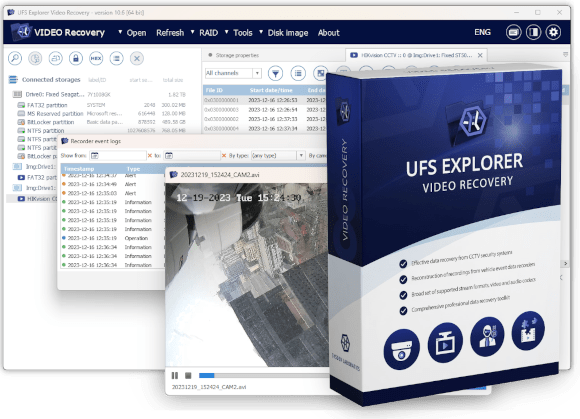

UFS Explorer Video Recovery
- Purpose-built for CCTV video recovery, surveillance footage analysis and forensic investigations
- Supports over 130 CCTV video stream formats and proprietary file systems used by surveillance system vendors
- Retrieves footage in its original form, preserving the source codecs and data without transcoding
- Two specialized scanning modes: CCTV scan for surveillance systems and RIFF/QTFF scan for vehicle event data recorders
- Frame-level disk location reporting and extraction of CCTV device event logs for forensic documentation
- Full support for RAID reconstruction, E01/AFF4 forensic images, disk imaging and encrypted storage
- Time-limited commercial and government licenses for Windows; protected by Thales Sentinel
Professional software for CCTV video recovery and forensic investigation





Specialized toolkit for CCTV footage recovery and forensic analysis
UFS Explorer Video Recovery is an advanced software solution for the recovery, analysis and forensic investigation of video recordings from CCTV surveillance systems and vehicle event data recorders (EDR and dashcams). It is not designed as a general data recovery tool with video support added on top. Instead, the software is built around the specific formats, workflows and evidentiary requirements associated with CCTV and dashcam footage.
It is geared toward professional users, such as law enforcement agencies, digital forensics investigators and computer forensics specialists who need to recover, verify and present CCTV or dashcam footage in a forensically sound manner. The software is licensed exclusively to commercial and government customers; personal licensing is not available.
The product runs on the UFS Explorer Professional Recovery engine, which provides the basic recovery capabilities required for disk imaging, RAID assembly, forensic image format support, decryption of encrypted storage and low-level analysis. On top of this foundation, UFS Explorer Video Recovery adds a dedicated layer for CCTV workflows, including support for over 130 proprietary surveillance stream formats and CCTV-specific file systems, two specialized scanning modes, video transmuxing without transcoding, frame-level disk location reporting and CCTV device event log extraction.
The software also handles common video formats (AVC/h.264, HEVC/h.265*) and can recover general file types through its standard scanning mode, though these are not its primary focus. For users dealing mainly with general-purpose video files on standard storage systems, UFS Explorer Professional Recovery is the more appropriate choice.
outputTransmuxed AVI without transcoding, frame-level reports, event logs, hash verification
Features unique to UFS Explorer Video Recovery
CCTV scan – automatic format recognition and reconstruction
The CCTV scan is the core feature of the software. It automatically detects the CCTV file system, video container format, video and audio codecs, and vendor-specific metadata on the storage device, without manual configuration. Using this information, it assembles a virtual video data structure in RIFF/AVI format that can be browsed, previewed and exported as-is.
Importantly, no frame conversion is performed. The original video data is preserved and exported exactly as recorded by the CCTV system. This is essential for evidentiary integrity, as the recovered footage remains identical to the source material at the frame level.
The scan can also be filtered by date and time range as well as camera number, which is particularly useful when working with large NVR systems containing extensive multi-camera recordings.
RIFF/QTFF scan for vehicle event data recorders and dashcams
Dashcam and vehicle EDR recordings present a specific challenge, as they are often interrupted during recording by accidents, power loss or sudden collisions – exactly the events investigators typically need to analyze. In such cases, a partially written RIFF or QTFF file may not be playable by conventional means, even though most of the underlying video data remains intact on the storage device.
The RIFF/QTFF scan locates video streams in these formats regardless of the file system state. When a recording has been interrupted, the software identifies and reassembles video segments from the remaining structures, including "tails" and "holes" within previously allocated areas. After that, it applies video transmuxing to produce a playable output. Individual frames are validated during reconstruction.
This scan enables recovery of recordings that have been deleted, partially overwritten or interrupted by the event under investigation, making it highly relevant for accident reconstruction and incident analysis workflows.
Forensically sound output and reporting
Evidentiary integrity is maintained throughout every step of the recovery process:
- Video transmuxing to AVI – footage is repackaged into a universal container without re-encoding any frame. The resulting video stream inside the AVI file is bitwise identical to the source recording, and this can be verified through the frame allocation report.
- Export as TIFF image sequence – for formats where container-based export is not possible due to specific codec constrains, individual video frames can be exported as lossless TIFF images.
- Frame-level disk location report – provides the exact physical storage location of each frame in a video stream. This creates a verifiable link between the output file and the underlying sectors of the source device.
- Per-file hash verification – calculates checksums for each output file, allowing detection of even single-byte changes through direct comparison.
- CCTV device event log extraction – extracts event logs from supported CCTV devices, providing metadata about recording sessions, camera activity and system events.
- Read-only operation – the software never writes to the source storage. All operations are performed on images or read-only mounts.
Typical investigation workflow
Supported CCTV formats, codecs and file systems
CCTV proprietary file systems
These are vendor-specific file systems written directly by NVR/DVR hardware to HDD or flash storage. Standard data recovery tools cannot interpret their internal structure. By contrast, the CCTV scan in UFS Explorer Video Recovery recognizes and reconstructs them automatically.
General-purpose file systems (used as metadata source)
CCTV systems that rely on standard file systems are also fully supported for both browsing and recovery. These are typically found in PC-based NVRs and some modern camera setups.
EDR/dashcam file systems
These are file systems used in vehicle recording devices such as dashcams and event data recorders.
Video codecs
Audio codecs
Video stream formats
Forensic and virtual disk formats
Technical specifications
Licensing, pricing and activation
| License/support | 1 year | 5 years (average per year) |
|---|---|---|
| Commercial — Extended Support | €8,000 | €5,600 |
| Commercial — Standard Support | €6,400 | €4,480 |
| Government — Extended Support | €6,400 | €4,480 |
| Government — Standard Support ★ | €5,120 | €3,584 |
★ Best available rate: €3,584/year. For multi-year licenses, each additional year beyond the first is charged at 62.5% of the base annual rate (-37.5%). A Sentinel HL dongle is included with the license at no extra cost. Plugin and support pricing details are available in the Software Support Policy.
Host OS & system requirements
Encryption support
- LUKS/LUKS2
- Apple FileVault 2
- Apple APFS encryption
- BitLocker/BitLocker To Go
RAID support (for multi-HDD NVR)
- Standard patterns: RAID 0, 1, 1E, 3, 5, 6, 7
- Nested RAID: RAID 10, 50, 60, 50E
- Automatic detection of mdadm, LVM, Apple RAID, Intel Matrix
- RAID assembly from disk images and virtual disks
- Saving and reloading RAID configurations
Additional features
Saving recovered footage
- Video transmuxing to AVI (no transcoding)
- Export as TIFF image sequences (lossless, frame by frame)
- Saving in original format where supported
- Export of individual damaged frames as images
Scanning
- CCTV scan (proprietary file systems and stream formats)
- RIFF/QTFF scan (vehicle DVR/dashcam formats)
- Combined CCTV and RIFF/QTFF scan
- Standard scan (all file types)
- Scan filters by date, time and camera number
- Pause, save and resume scanning
- Preview of intermediate results
Low-level analysis tools
- Hex editor for storage, partitions and files
- Field highlighting and data interpretation
- Parity calculator and XOR operations
- Storage content comparison
- Parallel search
Reporting
- Frame-level disk location report
- CCTV device event log (Hikvision, DHFS, etc.)
- Per-file hash verification report
- Interactive HTML report
- File listings in HTML, CSV and XML formats
- Software events log
Detailed product information
Purpose and scope of the product
UFS Explorer Video Recovery is a specialist tool for CCTV surveillance video recovery and forensic analysis. Its main strength lies in the depth of CCTV-specific knowledge built into the software, including support for over 130 proprietary surveillance stream formats, a broad library of CCTV file system parsers, and reconstruction algorithms tailored specifically for the way CCTV and EDR systems record and sometimes corrupt data.
The software also works with common video formats such as AVC (H.264) and HEVC (H.265*), and it can recover general video files through its conventional scanning mode. However, this is a secondary capability of the product. For users who mainly deal with standard video files on typical storage systems and do not require CCTV-specific processing, UFS Explorer Professional Recovery is usually the more suitable and cost-effective option.
Licensing model explained
UFS Explorer Video Recovery uses stricter licensing controls than other products in the UFS Explorer family, reflecting the sensitive nature of its use cases and the need to restrict access to investigative-grade functionality. Licensing is available exclusively to commercial organizations and government agencies; personal use licenses are not provided.
Licenses are time-limited and available for 1, 2, 3 or 5 years. Two support tiers are offered: Extended Support (full priority support) and Standard Support (20% reduced price). Two customer categories apply: Commercial (standard pricing) and Government (20% discount).
For multi-year licenses, each year beyond the first is billed at 62.5% of the base annual rate, which corresponds to a 37.5% discount. As a result, the most favorable pricing is a 5-year Government license with Standard Support, averaging €3,584 per year.
Licensing is managed through Thales Sentinel:
- Demo version – activated with a Software License (SL), an electronic Sentinel key bound to the fingerprint of the host machine. No physical device is required, and internet access is needed only for activation. Available on request for evaluation before purchase.
- Licensed version – supplied with a Hardware License (HL), a physical USB key that activates the software when connected and can be transferred between systems.
What can UFS Explorer Video Recovery handle?
UFS Explorer Video Recovery is particularly suited for investigations involving:
- Recovery of footage from CCTV NVR and DVR systems, especially those using proprietary file systems that general-purpose tools cannot analyze
- Reconstruction of dashcam or vehicle EDR recordings interrupted by accidents or power loss
- Forensically sound extraction of video evidence with full chain-of-custody support, including frame location reports, event logs and hash verification
- Work with CCTV storage using RAID configurations (multi-HDD NVR enclosures), encryption or forensic disk images such as E01 and AFF4
- Situations where the source footage cannot be transcoded; transmuxing preserves original codec data and prevents alteration of evidential content
Frequently asked questions
What types of CCTV and DVR systems does it support?
What does "forensically sound" mean in this context?
What is the difference between the CCTV scan and the RIFF/QTFF scan?
Who is this product licensed to?
How is the license delivered, and what is the difference between SL and HL?
What are the licensing costs?
Footnotes
* HEVC/H.265 streams are processed natively for recovery and analysis. Video decoding and preview are available only through an HEVC-compatible codec installed in the operating system.