

The basics of virtual machines and their potential data loss issues
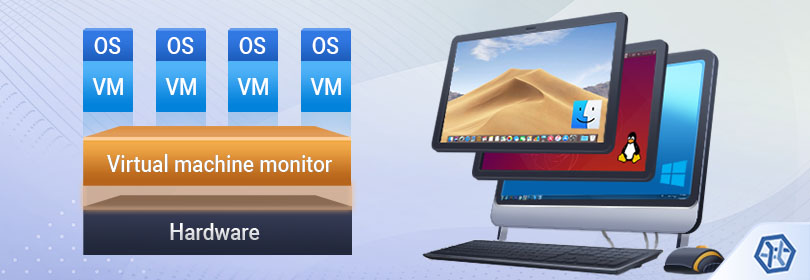
Virtualization has exploded in popularity over the past decade and keeps dominating today’s IT world. Virtual machines are widely utilized in both home and enterprise environments, making it possible to run multiple isolated operating systems of different types and versions on a single hardware platform thereby reducing the cost associated with purchase and maintenance of additional equipment. Each OS runs its own set of applications which in no way interfere with each other, therefore, the “neighbors” as well as the “host” will remain unaffected in case of its failure. However, making use of this technology, one shouldn’t be lulled into a false sense of security as virtual machines are still subjected to various issues, among which is loss or problems with access to critical virtually stored data.
What is a virtual machine?
A virtual machine is a special piece of software wich emulates the operation of a physical machine. Despite being located within a real physical host and making use of its resources, a virtual machine remains completely independent: it uses its own software-based components (the CPU, motherboard, video adapter, network interface, memory and hard disks), which may even differ from those of the host, and runs its own OS and applications.
The operating system the virtual machine is installed on is called the host OS, while the operating system of the virtual machine itself is referred to as the guest OS. Each guest OS starts up and runs in an individual window on a host OS, similar to an ordinary program.
All the virtual hardware which powers the guest OS is handled by a special engine called a hypervisor. The hypervisor is known as virtual machine manager: it allocates physical resources to each of the systems and ensures that they do not interrupt each other. As a rule, hypervisors are implemented on the software level, but there are also ones embedded into the system firmware.
The leading hypervisor products on the modern market include:
VMware offers an impressively extensive selection of virtualization solutions each tailored to specific needs, like VMware Workstation for Microsoft Windows and Linux, VMware Fusion for macOS as well as an enterprise-class hypervisor VMware ESXi which runs directly on the server hardware without any underlying operating system. Most products have free and paid professional versions.
Microsoft Hyper-V, formerly Windows Server Virtualization, is an advanced virtualization software option which is supplied with Windows Server 2008, Windows 8 and above and used mainly in the server environment, often for creation of private clouds. Supporting various releases of Linux, FreeBSD and Windows, Hyper-V provides a variety of tools for easy server management and powers Microsoft’s Azure Cloud.
Oracle VM VirtualBox is an open-source cross-platform virtualization software which supports a wide range of guest operating systems, such as Windows, Linux and BSD, and provides the ability to create multiple virtual machines and run them simultaneously.
Parallels Desktop is a paid virtualization solution developed specially for Apple Macintosh computers, which enables Mac users to run Windows, Chrome OS, or various Linux distributions along with the native operating system or utilize a second instance of macOS.
QEMU, short from Quick Emulator, is a free open-source virtualization platform which is popular among Linux users but can host on macOS and Windows via custom builds. QEMU is capable of both simulating hardware and hosting virtual machines, making the performance of VMs close to that of native installations.
Xen is popular virtualization software of Citrix with an open source code which is primarily employed by enterprises, like big internet service providers, to host servers or desktop operating systems. Xen can be implemented in a dedicated virtualization platform such as XenServer, and is also available as an optional configuration for Linux, BSD and Solaris operating systems. Both free and paid software versions are distributed.
Data storage peculiarities: virtual disks
Most virtual machines are configured to store their data, including the operating system and applications, in a special file called a virtual disk, which contains a file system and is presented to the guest OS like an ordinary physical hard drive. Such a file or a set of files can be stored on the host machine or a remote computer, be a part of a virtual machine or mounted in the OS of a physical machine. Basically, a virtual disk is the actual VM’s hard drive which can be of different types, usually differentiated by the file extension:
- VMDK (Virtual Machine Disk), a format used by VMware virtualization products;
- VHD (Virtual Hard Disk), a format used by Microsoft’s virtualization systems and Xen;
- VHDX (Virtual Hard Disk X), an improved VHD format typical for Hyper-V;
- VDI (Virtual Disk Image), a native virtual disk format of VirtualBox;
- QCOW and QCOW2 (QEMU Copy-On-Write) used by QEMU and Xen;
- HDD (Hard Disk Drive), a format used mainly by Parallels.
Some hypervisors support multiple virtual disk formats, for example, VirtualBox is able to work with VHD and VMDK files, while VMDK containers are also supported by QEMU and Parallels.
Possible difficulties and ways to overcome them
No doubt, virtualization brings about numerous advantages, such as reduced expenditure on hardware resources, software isolation, elimination of compatibility issues, mobility and more efficient IT operations, but, as is often the case, has many shortcomings.
Slower usability
A virtual installation cannot be as efficient as a real machine, especially when several VMs are running, for it doesn’t have direct access to hardware and the need to allocate physical resources creates additional overhead.
Higher risks of a downtime
Consolidation of several systems on one piece of hardware makes it a single point of failure: if the physical host crashes, this will impact all the virtual machines which reside on it, making them unavailable.
Problems with data sharing
A usual way to exchange information between the host OS and the guest OS is to run both of them and use virtual network transport. Virtualization software often offers transport wrapper software for a guest OS, allowing for file exchange with the help of a simple drag-and-drop procedure. However, this process may require much time or simply be impossible in the following situations:
- Getting data from a historical virtual machine snapshot: running a virtual machine is not recommended in order to avoid modifying the snapshot. It's required to copy the virtual disk with the setup and boot a new virtual machine.
- Utilities of the virtual machine are not installed for some reason, either because of isolation of the virtual machine or non-availability of utilities for a guest OS.
- No special networking protocols are installed on the guest OS – isolation of the virtual machine does not allow file transfer.
- File size limit – the software may have problems with copying very large files from the guest OS to the host OS.
Yet, there is a better solution for files exchange between the guest and the host operating systems. As required files are already stored on the host computer inside the virtual disk, it's possible to extract these files from the virtual disk at a logical level. SysDev Laboratories offers UFS Explorer software as a perfect solution for opening such virtual disks, browsing their files and folders and copying them out to the host OS. For detailed instructions, please, visit Data acceess on a virtual machine.
Data loss issues
Virtual machines have a bunch of vulnerabilities which often result in the corruption of critical data or its loss:
-
Software malfunction
Virtualization software may also have its inner bugs and crash unexpectedly, provoking the loss of virtually stored files;
-
Virtual disk corruption
Like any computer file, a virtual disk is prone to corruption, which may be caused by a malware attack, software glitches or even age;
-
Migration failure
Failed VM migration may occur due to various factors, like a faulty network or abrupt disconnection of a storage device during the transfer of a virtual drive, and is very likely to damage VM files;
-
Deleted files
Accidental deletion of a VM configuration file or a VD file may be caused by a user/administrator mistake, while most hypervisors do not provide built-in undelete functions;
-
Problems with snapshots
Snapshots tend to grow in size quickly and can cause issues when being deleted/committed to the original VM disks or even create lack of space leading to the corruption of the whole VM. Multi-layered snapshots are also very susceptible to errors;
-
File system damage
The corruption of the file system of a virtual disk or the host a virtual machine is situated on makes its files absolutely unreadable with standard means;
Hint: To learn more about file systems and their functions, please, refer to the basics of file systems.
-
Power failure
Power outages usually result in a forced shutdown of a system which may not only damage the host’s hardware but also lead to the corruption of a virtual machine, if it was active at that very moment.
In case of data loss from a virtual machine, UFS Explorer data recovery products can bring the lost files back with the maximum possible result. Supporting virtual disk formats of major virtualization software vendors, the software can open the virtual disk file and allows the user to find and copy the needed data. For detailed instructions in the event of such an issue, please, visit Data recovery from virtual machines.
Last update: August 6, 2022