
How can I recover data from a computer with a failed OS?
Despite the steadily improving reliability of modern operating systems, they are still not designed to absolute perfection. Sooner or later, most of them suffer from some technical issues. A system failure may be caused by a hardware malfunction or a software crash and results in the inability of the OS to boot normally. It may constantly reboot and freeze with an error message displayed on the screen or even stop working entirely without any notifications.
Reinstalling the OS from scratch usually helps to solve the above-mentioned issues. However, a fresh installation destroys everything stored in the system partition and provokes massive loss of user data from the internal hard drive. That being so, all the critical files need to be copied out from the storage before the newly installed OS overwrites them. Yet, the crashed operating system will prevent any straightforward access to the content of the drive. Fortunately, there are still a couple of ways to settle things down.
To determine the most appropriate course of action, first and foremost, it is important to find out the nature of the problem you are dealing with.
Hard drive failure
Unusual noises from the drive, like clicking or grinding, the messages "Invalid System Disk" or "Please Insert Bootable Media", particularly when the machine doesn't detect the drive, are signs of a disk failure rather than an OS issue. When facing any of these symptoms, please shut down your computer, carefully eject the drive, pack it into an anti-static bag and take it to data recovery specialists for the examination. Please mind that any further manipulations with the drive (including efforts to repair it or recover its data with a dedicated program) performed by a user without proper training and equipment may lead to its further damage and make your data loss case even more complicated.
Defective hardware
Hardware-related problems frequently cause OS failures as the computer becomes unable to function normally. A faulty power supply provokes an immediate shutdown of a system; a bad processor makes it impossible for the computer to process requests or operate in general; a flawed RAM chip may keep the OS from accessing critical data and cause a "Fatal exception error". As a rule, the computer informs about these problems on startup using error codes displayed on the screen or BIOS beep codes. In order to decode them, you may refer to the website of the motherboard’s manufacturer. As well as in case of hard drive failure, the hardware problems should be handled by a qualified specialist.
Nevertheless, when you suspect any damage to the computer's hardware other than the failure of the hard disk drive, you can take the latter out of the machine and use another computer to recover the lost files as described in the instructions below.
UFS Explorer and Recovery Explorer are reliable software products that serve for effective data recovery from hard disk drives with any file system of Windows, macOS, Linux or UNIX/BSD, along with a variety of other tasks associated with data loss. Multiple editions are provided to address different storage technologies available on modern devices. The utilities thoroughly inspect the digital medium in a safe read-only mode, extract the lost data and enable its copying to a safe local or network storage.
Hint: For detailed information about the supported file systems and additional storage technologies please refer to the product specifications and the storage technologies page.
If you are performing the procedure using UFS Explorer Standard Recovery, please, complete the following steps:
-
Prepare another computer that can be used for data recovery. Download and install the software onto it. See to it that the version of the application matches the OS under which it operates.
Hint: If you have any difficulties with the installation of the utility, please refer to the installation manual for UFS Explorer Standard Recovery.
-
Find a storage capable of locating the recovered files: an internal drive of the host PC, any portable device connected to it or a network folder.
-
Shut down the defective computer, unscrew its tower and extract the hard disk drive holding the data. In case of an HDD disk, please handle it very cautiously and keep it horizontally on a flat surface during the manipulations. SSD drives are less fragile, but please be careful when handling them as well.
-
Switch the host computer off and attach the removed hard drive to it using the fastest possible interface. It is desirable to employ a SATA port found on the motherboard, but for convenience you may choose a USB to SATA adapter or a disk enclosure.
Hint: If you don't know how you can plug the drive into the motherboard of the computer or connect it externally using a USB to SATA adapter, please rely on the provided video tutorials.
-
Run the host PC and start UFS Explorer Standard Recovery. If necessary, modify the software settings in the respective pane.
Warning: When you boot the computer, the operating system may prompt formatting or repairing the connected drive. Please avoid doing it, as this may cause serious difficulties or even permanent data loss.
-
Find your hard drive among the connected devices in the left pane, select it and launch its scanning using the corresponding button in the top toolbar or at the bottom of the window, or a similar option in the storage context menu.
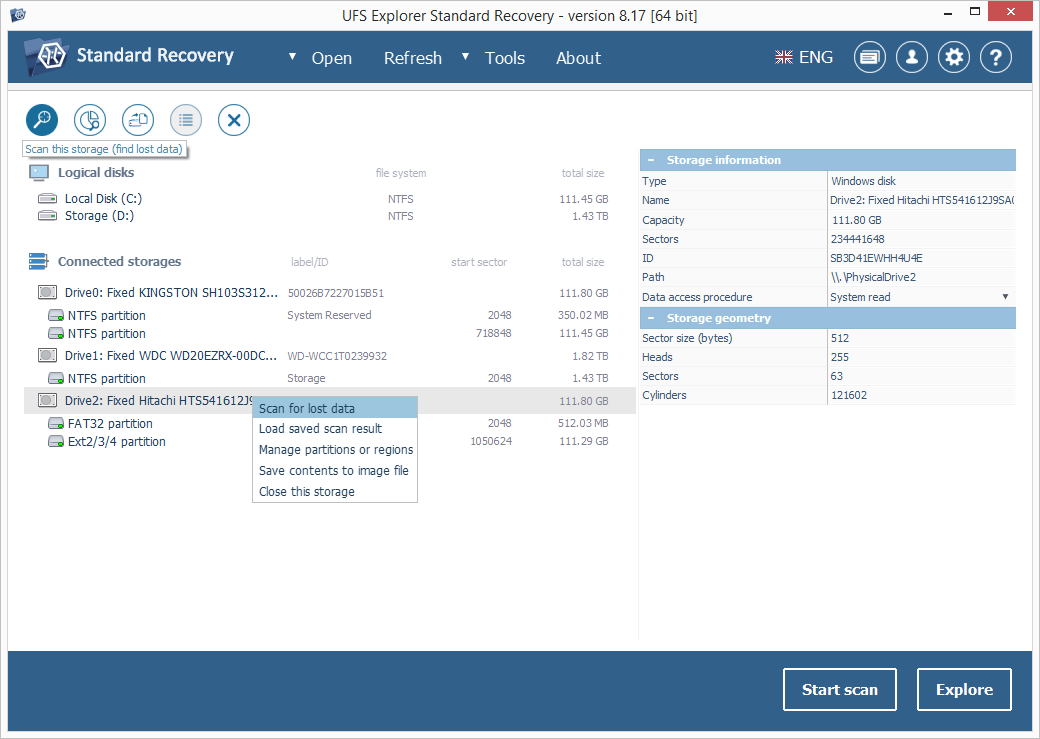
Note: If your drive is missing in the list of devices and refreshing the list of storages or reconnecting it does not help, you are likely to have a physically flawed drive/enclosure that should be handled by a technical specialist.
-
Specify the preferred scan parameters. After that, hit "Start scan" and wait until the operation is finished.
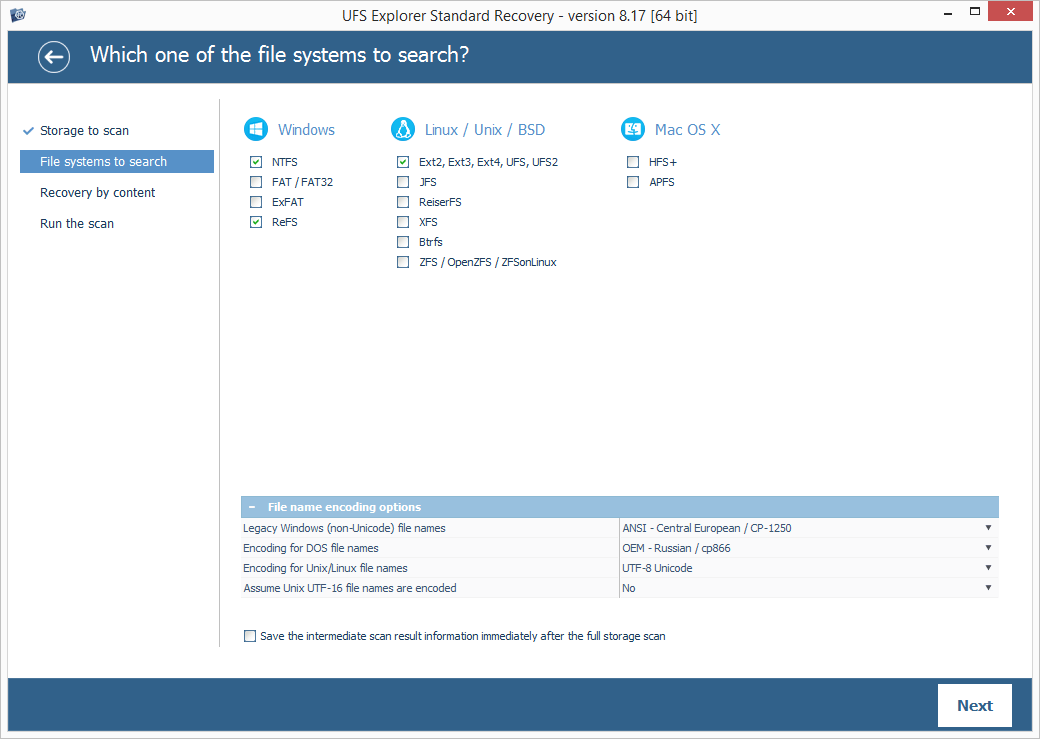
Hint: More information about configuring the scan can be found in the instruction on scanning a drive with UFS Explorer.
-
Examine the file system reconstructed by the application. Provided that the indication of file’s status is activated, they will be listed with circular icons that refer to their integrity: a green icon is used for "good" files with a valid header; a red icon corresponds to "bad" (zeroed) files; a gray icon may indicate a partly damaged file or a specific file format whose validity couldn’t be verified. The red color of names helps to distinguish between the recovered deleted folders/files and the available data.
You may also sort the elements by name, date, size, employ quick or advanced search and preview images, videos, audio files or PDF documents. After that, click "Define selection" and choose the items to be saved by checking them off.
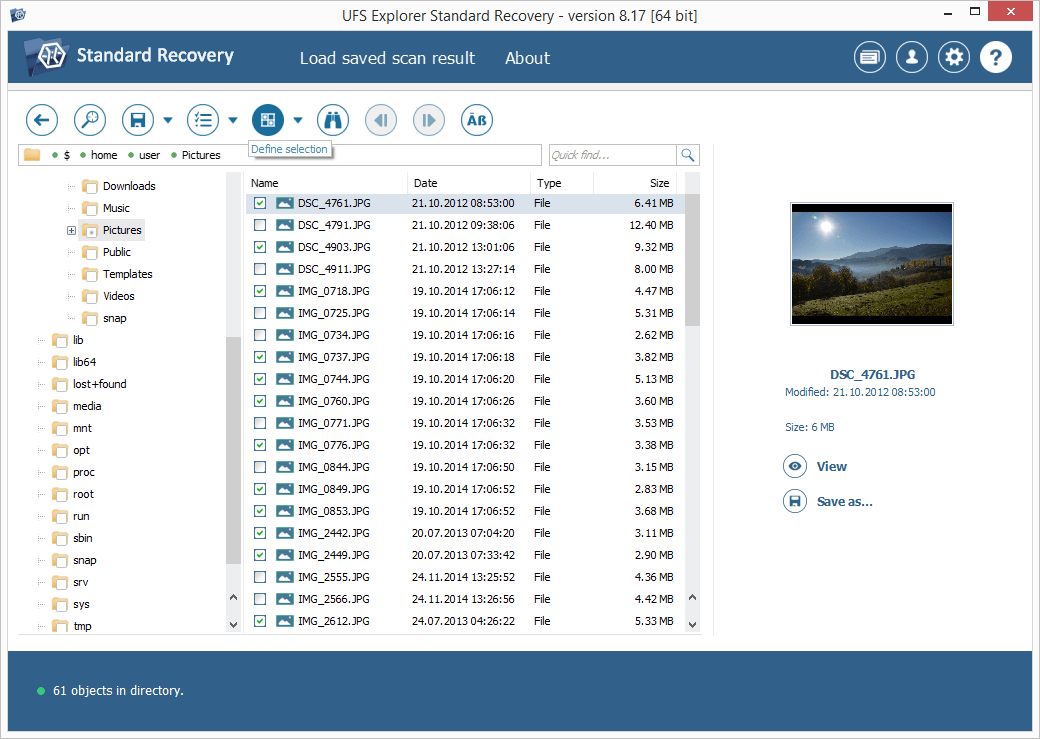
Hint: The guide Evaluation and saving the results of data recovery may facilitate your work with the found folders and files.
-
Pick out a destination folder for the obtained data in the opened dialog. Please never save the detected elements to that very drive they are being retrieved from, as it can provoke irreversible data loss.
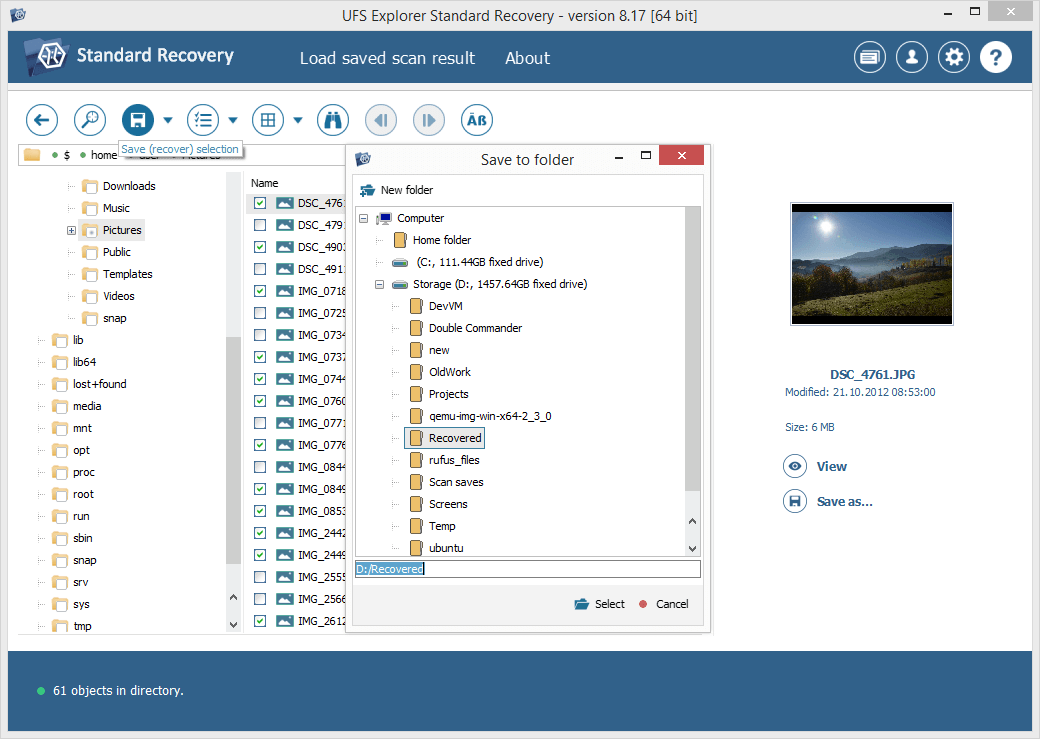
Hint: If you are going to save the recovered data to a network storage, please check the provided guide.
Software issues
If every piece of the computer system’s hardware is intact, the failure has most likely resulted from a software glitch, like a malware infection, improper system shutdown, conflicts between applications, incorrect system update, bad drivers, wrong settings or boot sequence which has led to the corruption of the partition table, master boot record, critical system files or even the entire file system. You may see the prompts, like "Error loading operating system," "Non-System disk or disk error," "Invalid partition table," "NTLDR is missing," "Your PC ran into a problem and needs to restart," etc. Under such circumstances, it is possible to recover data using another computer, like in the case of hardware-related issues. The steps to perform will be just the same.
However, if removing the drives from the affected machine is impossible or undesirable, for instance, due to the warranty or lack of expertise, you may use UFS Explorer Backup and Emergency Recovery CD to boot the computer in a safe environment and carry out the procedure without disassembling the device. Having decided on this option, you will need to create a bootable USB device with the downloaded ISO-file and restore files using a live operating system with pre-installed data recovery software as explained in the instructions.
Last update: June 19, 2024