
Data distribution and recovery peculiarities on different RAID levels
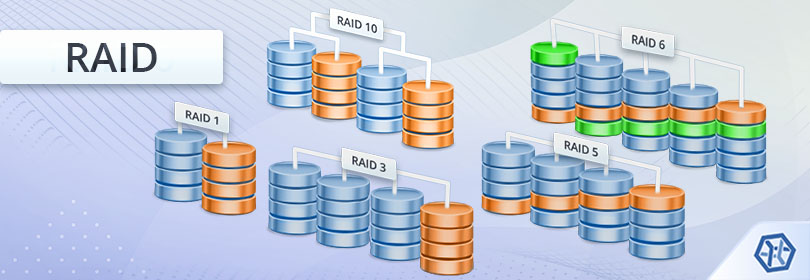
The tremendously growing scope of information processed by computer systems has led to the need for voluminous storage devices capable of holding large amounts of data. This need was addressed by the emergence of RAID-based storages that became popular not only with big companies but also small offices and home users.
The RAID technology (Redundant Array of Independent Disks) is perfect for storing lots of data and keeping it readily available, but, unfortunately, may not always prove to be reliable. Even robust redundant systems are subjected to various issues and can fail, causing the loss of important information. This article will help you to understand the principles of data organization on RAID and provide other background information that may facilitate in the recovery of files lost from it.
The most important RAID terms
Technical information related to RAID is generally provided in special terms characterizing this type of storage. The most commonly used terms referred to such arrays are:
-
RAID – a Redundant Array of Independent Disks. The term denotes a storage scheme in which independent drives (or partitions) are combined into a single logical unit. Depending on the actual data organization on the storage, this scheme may increase its capacity, performance or/and reliability.
-
Hardware RAID – a hardware-driven RAID system. Hardware RAID consists of a RAID controller chip or a board that operates the array and a set of attached drives. The operating system detects the whole arrangement as a single storage device. The information is managed by a hardware controller which also stores the RAID settings.
-
Software RAID – a software-driven RAID system. Software RAID doesn't use any hardware constituents and is created on a set of independent storage units by the operating system or another software component. The OS recognizes the software array as a single storage device. Data is operated by the OS drivers using the CPU time without additional hardware (e.g. NT LDM software RAID of Windows, mdadm RAID of Linux, software RAID created with the Disk Utility of macOS and others).
-
Virtual RAID – hardware or software RAID that was reconstructed from its components in a virtual mode. This is a virtual storage created by data recovery software to emulate the original storage for data recovery purposes.
-
RAID component – a drive or partition used as a part of a RAID system.
-
Mirroring – a data organization technique based on the replication of information onto separate components. A mirror creates a complete copy of one component and uses another component to store this copy. This ensures high fault-tolerance: If one component fails, a copy of data located on the other component of this RAID can still be accessed. The mirroring technique is implemented in RAID level 1.
-
Striping – a data organization technique based on the distribution of its fragments among the components of the array. Data striping allows users to significantly increase the Input/Output (I/O) performance of a RAID storage. Data of the drives set is divided into small parts (stripes) and distributed across all available components. Striping speeds up storage performance due to parallel reading/writing to all components. Striping is implemented in RAID level 0.
-
Parity – a data organization technique based on writing bits of information from different RAID components to a dedicated component or simply other components of the array. Parity allows increasing fault-tolerance of the storage: in case of the failure of any drive, its content can be reconstructed on a replacement drive with the help of the data from the remaining drives (provided that only one drive fails).
-
Reed-Solomon code – an error-correcting algorithm based on Galois Algebra. The Reed-Solomon code allows increasing reliability of an array and enables it to withstand up to two simultaneous drive failures. This algorithm is used in RAID 6.
RAID systems without redundancy
When applied to RAID level 0 or JBOD, the term RAID does not explain the actual functions of these storage technologies. These storage types perform in the following way:
-
JBOD: A storage built from a certain number of drives that may even be of different sizes. Each component of JBOD follows the previous one to create a single logical unit with the size that equals the sum of the sizes of each component. JBOD is supported by most hardware RAID chips as well as software RAID (e.g. Dynamic Disks under Windows can span across different drives or partitions).
-
RAID 0: A set of stripes on drives of the same size. Data on this level is divided into “stripes” of equal size and is cyclically allocated among all the drives. The size of such a “stripe” usually ranges from 512 bytes and up to 256 KB. The data striping technique serves for distributing long fragments of information among all the drives. This allows issuing simultaneous data exchange requests to all drives and speeding-up this operation with parallel read or write. These systems feature the highest speed and maximally efficient use of disk space.
Data recovery chances for these systems are obvious: even if one drive from such a system cannot be read out, data of the whole storage becomes unreadable. If the failure of a single drive occurs on JBOD, the entire fragment of a span becomes unrecoverable. For RAID level 0 this will affect all data on the set (e.g. if RAID 0 is built on 4 drives with the stripe size of 16 KB, after the failure of a single drive, the storage will have a 16 KB “hole” after each 48 KB block. In general, this means that any file with a size bigger than 48 KB cannot be recovered).
Note: If one or more drives from RAID 0 or JBOD failed, stop using the system and contact a data recovery laboratory. Only physical repair of the drive can help to recover your files in this case.
If the reason for RAID failure is other than the failure of a drive (e.g. a reset of controller settings, failure or damage to a controller, etc.), the information remains recoverable even after the logical damage to a file system. The only thing you should do in this case is to assemble the original storage using data recovery software. For this you have to specify the member drives according to the initial drive order and the size of the stripe. Data recovery software will read data from the components in the same manner as a RAID controller and will provide access to files on a virtually reconstructed array.
RAID systems based on mirroring
The mirroring technique is implemented in RAID 1. Data of each RAID component is duplicated, enabling the recovery of lost information from any undamaged component of the system. The controller performs parallel reading operations to speed up read access to files.
This kind of storage features the highest redundancy and the best chances for data recovery. The only thing you should do is to scan the available component using efficient data recovery software.
RAID systems with redundancy
Advanced redundant systems are created to compromise between high speed of access, storage capacity and redundancy. These systems are usually based on the idea of striping from RAID level 0, but the data is extended with extra information – parity information which adds redundancy and makes it possible to recover files or even continue working with the storage after the failure of its component.
Such systems include RAID 3, RAID 4 or RAID 7 (a stripe set with dedicated parity), RAID 5 (a stripe set with distributed parity) and RAID 6 (a stripe set with double distributed parity). The term “single” parity means that the information is recoverable or the system is functioning after the failure of a single component; “double” parity – up to two components.
RAID 3 and similar systems use the classic technique of RAID 0 extended with one additional drive to store parity. RAID 5 and RAID 6 distribute parity among all the drives to speed up the parity update process for data write operations.
Data recovery from these systems is possible in case of an undamaged array and if one (in RAID 3, RAID 4, RAID 5, RAID 7) or up to two (in RAID 6) components are unreadable.
Note: In case of the failure of more drives, stop using the storage immediately and take it to a data recovery laboratory. Retrieval of the data is possible only with professional help.
If data recovery is possible without repair, you should assemble your RAID using data recovery software specifying the drives (including placeholders for any missing drive), drives order, stripe size and a parity distribution algorithm. Data recovery software will read the data from the components in the same manner as a RAID controller and will provide access to files on virtually reconstructed RAID.
Note: If more drives fail, than permitted, stop using the storage immediately and take it to a data recovery laboratory. Recovery of the information is possible only with professional help.
If data recovery is possible without repair, you should assemble the array using data recovery software specifying the drives (including placeholders for any missing drive), drives order, stripe size and a parity distribution algorithm. Data recovery software will read the data from the components in the same manner as a RAID controller does and will access files completely on virtually reconstructed RAID.
Hybrid (nested) RAID systems
Nested configurations are often used to improve the overall performance, add redundancy and for other performance-related reasons. As a rule, such systems are combinations of the above-mentioned RAID layouts. The most common are systems like RAID 10: several “mirrors” with a “stripe” over them. Mirrors here ensure redundancy and a stripe over mirrors increases the read/write speed. Data recovery from such a system is quite simple: you should take any undamaged component from each mirror and virtually build RAID 0 over it.
More advanced systems include RAID 50 (a stripe over RAID level 5), RAID 51 (a mirror of RAID 5), etc. To reconstruct such a system, for instance, RAID 50, the assembly of each RAID component of the lower-level (in this example each RAID 5) and then building RAID from these components (in this example RAID level 0) is required.
UFS Explorer RAID Recovery is recommended as the most efficient software for data recovery and virtual reconstruction of any RAID level.
Data organization on RAID
Different RAID levels apply different data organization techniques for different purposes. Each of the levels has its own advantages and disadvantages.
RAID level 0 (RAID 0, data striping)
RAID level 0 is the best example of data striping as it is. The term Redundant Array of Independent Disks” does not actually explain the functionality of this level because it does not imply redundancy. This type of storage may consist of two and more units. Stripes are defined as data fragments and each stripe is located on a subsequent storage unit.

Figure 1. Data organization on a stripe set (RAID 0)
Figure 1 shows data striping employed in RAID level 0. Such a scheme allows speeding I/O operations up to U times (where U is the number of units in RAID 0). This is achieved by sending concurrent or consequent I/O requests to different units (usually different hard drives). For example, in order to read stripes 0..3 (a data segment with the size of 4 stripes), the controller sends 2 concurrent read requests: to read two first stripes from Unit 1 and two first stripes from Unit 2. Units implement physical reading simultaneously and the controller gets the result two times faster.
This method of organization allows using almost the whole storage space for data leaving no redundancy on the data area. However, the capacity of the storage is sometimes less than the sum of sizes of individual units because the controller can reserve some storage space for its own technical needs.
The advantages of RAID level 0:
-
Extremely high performance in both reading and writing operations;
-
Simple implementation (even most on-board SATA controllers support RAID level 0);
-
Up to 100% disk space is available for data;
-
The most affordable RAID solution.
Disadvantages of RAID level 0:
-
No fault-tolerance: Failure of a single component causes data loss.
Data recovery perspectives of RAID 0
-
Controller failure/disassembled array: With information about the stripe size and the order of components you can easily recover lost information.
-
Damaged unit: If any of the units is unreadable, the recovery of subsequent data segments beyond the StripeSize* (UnitsCount-1) is impossible.
RAID level 1 (RAID 1, data mirroring)
RAID level 1 implements the technology of data mirroring. Mirroring creates the exact copy of the information and stores it on a separate drive. The capacity of RAID 1 equals the size of the smallest storage component without the space that can be reserved by the controller. When the controller reads data from RAID 1, it can send requests to any of the drives to speed up the I/O operation. Writing operation works either in a parallel mode (to both drives simultaneously) or consequently (onto one drive after another, which can be fault-tolerant). RAID 1 doesn't employ data segmentation.
The advantages of RAID level 1:
-
Fast reading operations;
-
Increased fault-tolerance;
-
Keeps operating even when at least one mirror drive is intact (in a “degraded mode”);
-
One of the most available solutions supported by most on-board SATA controllers.
Disadvantages of RAID level 1:
-
The most inefficient use of disk space;
-
Slow writing operations.
Data recovery perspectives of RAID 1
-
Controller failure/disassembled array: it is easy to recover all the information from any component;
-
Damaged unit: data can be recovered from any readable unit.
RAID level 4 (RAID 4, stripe set with dedicated parity)
RAID 4 is the first successful attempt to compromise between fault-tolerance, speed and cost. The technique implemented in RAID 4 is based on the usual Stripe Set (like in RAID level 0) extended with one more special components to store the parity information for error control. This array may consist of 3 or more drives. This scheme is also implemented in RAID level 3 with the difference in the striping method that is byte-level for RAID 3 and block-(sector) level for RAID 4.
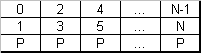
Figure 2. Data organization on a stripe set with dedicated parity (RAID 4)
Figure 2 displays the method of fault-tolerance in action. The stripe set stores the actual RAID data. Each “column” of stripes is summed with XOR to achieve parity.
RAID 4 has such similar to RAID 0 features as fast reading operations and large storage capacity, at the same time, this level incorporates its own feature of extended internal error correction. If some stripe becomes unreadable, the controller is capable of reconstructing it based on the information from other stripes and parity. The drive designated for parity is not used for storing data but rather as a backup unit.
The advantages of RAID level 4:
-
Ever-faster reading operations;
-
High fault-tolerance;
-
Keeps operating in a “degraded mode” when one of the drives fails;
-
Cost-efficiency in respect to fault tolerance.
Disadvantages of RAID level 4:
-
Remarkably slow writing operations: any writing/updating operations require updates of parity information on one dedicated drive;
-
Slow reading operations in a degraded mode due to a high load on the parity unit.
Data recovery perspectives of RAID 4
-
Controller failure/disassembled array: easy to recover all data. N-1 drives are required, data drives are preferred (to build virtual RAID 0); information about the order of drives and the stripe size are required;
-
Damaged unit: the chances for recovery are close to 100%, if only one drive fails. If two or more drives fail, the same problem as with RAID level 0 occurs.
RAID level 5 (RAID 5, stripe set with distributed parity)
Presently, RAID level 5 is the best compromise between fault-tolerance, speed and cost. The technique used in RAID 5 is based on the usual Stripe Set (like in RAID 0) which in this level mixes data and parity information. Like RAID 4, it requires at least three drives but has no special drive for storing parity without creating such a “queue” for parity updates during writing operations.
Depending on the purpose, implementation, retailer and other factors, RAID level 5 may differ in methods of parity distribution across the stripe set. The most common methods include: Left-symmetric (backward dynamic parity distribution), Right-symmetric (forward dynamic parity distribution), Left-asymmetric (backward parity distribution) and Right-asymmetric (forward parity distribution).
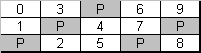
Figure 3. Left Symmetric parity distribution (RAID level 5)
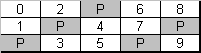
Figure 4. Left Asymmetric parity distribution (RAID level 5)
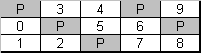
Figure 5. Right Symmetric parity distribution (RAID level 5)
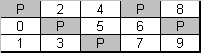
Figure 6. Right Asymmetric parity distribution (RAID level 5)
Fault-tolerance is achieved by the same means as in RAID 4: the stripe set stores the actual data and the parity information; each column of stripes is summed into a parity stripe of the column.
RAID 5 combines the features of RAID level 0 (fast reading operations and large capacity) and RAID 4 (extended internal error correction). If the stripe becomes unreadable, the controller is capable of reconstructing it based on other stripes and parity information. The actual capacity of RAID 5 is (U-1) * (min(unit size) – Reserved).
Advantages of RAID level 5:
-
Ever-faster reading operations;
-
Fast writing depending on the method of data and parity distribution;
-
Fault-tolerance;
-
The array may operate in a “degraded mode” when one drive fails;
-
Cost-efficiency in respect to fault tolerance.
Disadvantages of RAID level 5:
-
Slower writing operations in comparison to RAID 0;
-
The speed of writing operations depends on the content and parity distribution method.
Data recovery perspectives of RAID 5
-
Controller fault/disassembled array: easy to recover all the data. All undamaged drives are preferred, but N-1 is required; the information about drives order, stripe size and parity distribution method is required;
-
Damaged unit: the chances for recovery are close to 100%, if only one drive fails. If two or more drives fail, the same problem as with RAID 0 occurs.
RAID level 6 (RAID 6, stripe set with double distributed parity)
Being a reliable and at the same time cost-efficient data storage solution, RAID 6 was created with the aim to extend RAID level 5 with one more stripe for data redundancy. For this purpose, the Reed-Solomon Code algorithm based on Galois field algebra is applied. This technique allows adding one more unit for data redundancy and correcting disk errors efficiently.
The layout of RAID 6 is similar to RAID 5: data and parity (P-stripe) are distributed across storage units. The difference is in an additional stripe (Q-stripe) located along with P-stripe and containing GF sum of data.
For more information about RAID 6 and Q-stripe algorithms, please, go to A Tutorial on Reed-Solomon Coding
Advantages of RAID level 6:
-
Ever-faster reading operations;
-
Fast writing operations depending on the data and parity distribution method;
-
High fault-tolerance;
-
The storage may operate in a “degraded mode” when one drive or even two drives fail;
-
Cost-efficiency in respect to fault tolerance.
Disadvantages of RAID level 6:
-
Slower writing operations in comparison to RAID 0;
-
The speed of writing operations depends on the content and parity distribution method.
Data recovery perspectives of RAID 6
-
Controller fault/disassembled array: easy to recover all the data. All undamaged drives are preferred, but N-1 or N-2 is required; the information about the order of drives, stripe size and parity distribution method is required;
-
Damaged unit: the chances for recovery are close to 100%, if only two drives fail. If more than two drives fail, the same problem as with RAID 0.
Nested RAID: level 0+1, level 10, level 50, level 51 etc.
Nested implementations based on RAID 0, RAID 5 and RAID 1 were created to enhance the performance capabilities of RAID systems. RAID level 0+1 applies a mirror of stripe sets to increase fault-tolerance without affecting storage performance. RAID level 10 applies an extension of stripes to mirror the data improving performance capabilities and increased use of storage capacity. RAID level 0+1 and level 10 require at least four drives. RAID 50 is a stripe set of RAID 5 storages created for performance reasons and RAID 51 is a mirror of RAID 5 created for fault-tolerance (requiring at least 6 drives to be built).
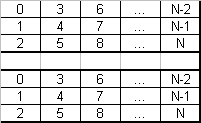
Figure 7. Data organization on a mirror of stripes (RAID 0+1; 6 units)
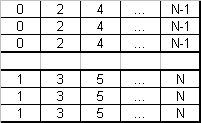
Figure 8. Data organization on a stripe of mirrors (RAID 10; 6 units, 2x3 mirrors)
The advantages of nested layouts:
-
Increased speed or fault-tolerance;
-
The array can operate in a degraded mode;
-
RAID 10 and RAID 0+1 are the most available solutions (some on-board controllers support these RAID types).
Disadvantages of nested RAID:
-
An expensive solution as most of the disk space is used for mirrors;
-
Hard to manage and maintain.
Data recovery perspectives of nested RAID
-
Controller failure/disassembled array: easy to recover all the information;
-
Damaged unit: recovery chances are close to 100% if it's possible to virtually assemble at least one stripe set (RAID 10, RAID 50) or at least one mirror instance (RAID 0+1, RAID 51).
Data recovery on RAID
Files lost from RAID can be easily regained with the help of efficient data recovery software capable of reconstructing complex storage systems. For this purpose, SysDev Laboratories offers the UFS Explorer products: UFS Explorer RAID Recovery was specially developed for handling arrays of various levels while UFS Explorer Professional Recovery presents a professional approach to the process of data recovery. The software applies sophisticated techniques, making it possible to achieve the maximum recovery result, and is 100% reliable, guaranteeing the complete safety of the data. Among the configurations supported by the software are:
-
Standard RAID levels: RAID 0, RAID 1, RAID 1E, RAID 3, RAID 4, RAID 5, RAID 6;
-
Nested RAID layouts: RAID 0+1, RAID 10, RAID 50, RAID 51, etc.;
-
Custom RAID patterns;
-
Non-standard RAID sets: Drobo BeyondRAID, Synology Hybrid RAID, ZFS RAID-Z, Btrfs-RAID.
Hint: For detailed information concerning the supported technologies, please, refer to the technical specifications of the respective software product.
The utilities automatically recognize the RAID metadata present on the member drives and use it to reconstruct the array. Yet, in case of serious metadata damage, the following information may be required to assemble the storage:
-
RAID level;
-
The order of its components (except for RAID 1);
-
Stripe size (except for RAID 1);
-
Parity distribution and other parameters (if applicable).
For more detailed instructions, please, refer to the respective tutorial devoted to RAID recovery:
-
For RAID 1, RAID 3, RAID 4, RAID 5, RAID 6 – Systems with redundancy;
-
For RAID 0 and JBOD – Systems without redundancy;
-
For RAID 0+1, RAID 10, RAID 50, RAID 50E, RAID 60, etc. – Nested layouts.
Last update: August 06, 2022