In depth
Detailed product information
When single-disk recovery tools fall short
A standard data recovery tool is intended for a single drive. It works by reading the file system and searching for lost data on that device. However, this approach is not applicable when data is spread across multiple drives that must be combined and interpreted as a single system. RAID operates by distributing data blocks, and sometimes parity information, across member drives according to a pattern defined by the RAID configuration. No individual drive contains a complete copy of the data, and the file system exists only at the virtual layer of the assembled volume.
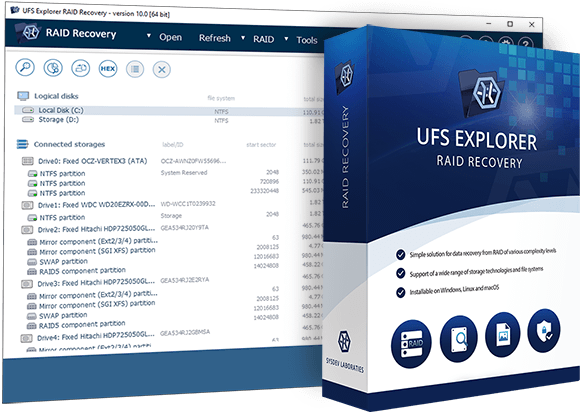
UFS Explorer RAID Recovery bridges this gap by first reconstructing the virtual volume from the raw drives and then applying standard recovery techniques to the resulting storage. This two-stage approach, array reconstruction followed by file system recovery, is what distinguishes this edition from UFS Explorer Standard Recovery.
Supported RAID configurations in detail
Hardware RAID controllers may store configuration metadata on the member drives using different proprietary formats. The software recognizes DDF1 metadata used by LSI, Dell and Intel controllers, as well as formats from Silicon Image, JMicron, 3ware and Intel Matrix RAID. On the software RAID side, it supports Linux mdadm arrays, which are commonly encountered in Synology and other Linux-based NAS systems, as well as Windows NT LDM and Storage Spaces, Apple Software RAID and APFS-based Fusion Drive, and LVM including configurations with Thin Provisioning*.
For ZFS-based storage, the software can assemble and read ZFS stripe volumes, including RAID-Z, RAID-Z2 and RAID-Z3. For Drobo devices, where BeyondRAID uses a proprietary block allocation method that doesn’t follow any standard RAID level model, the dedicated assistant tool handles the layout internally without requiring the user to specify RAID parameters.
How NAS data recovery works in practice
When a NAS device fails, whether due to a controller board defect, power supply malfunction, firmware corruption or one or more drive failures, the first step is to power it off immediately. The drives should then be removed and not reconnected to the NAS. Each drive should be connected individually to a recovery workstation to evaluate its condition before any recovery measures are taken.
Drives showing read errors, unusual acoustic behavior or S.M.A.R.T. warnings should be imaged before any further processing. Once images are created, the software loads them alongside any healthy original drives and attempts automatic RAID assembly. In most cases involving major NAS brands, a usable virtual volume can be reconstructed within seconds after loading all components.
If automatic assembly doesn’t succeed, the RAID Builder provides an alternative: a guided interface where the user can specify parameters such as RAID level, the order of member drives, the stripe size (typically 64 KB or 128 KB for most NAS systems) and the data start offset. The software then builds a virtual RAID from these inputs, which can be accessed and checked for consistency before starting a full scan.
UFS Explorer RAID Recovery vs Standard Recovery – choosing the right edition
UFS Explorer Standard Recovery is designed for single-disk storage. It works with one drive or one disk image at a time. It can automatically assemble simple spanned volumes, such as LVM, LDM or Apple RAID, when their metadata is intact. However, it doesn’t provide any tools for manual RAID assembly, NAS metadata recognition or adaptive reconstruction using bad-sector maps.
UFS Explorer RAID Recovery is ideal for situations involving storage systems with multiple drives or data loss scenarios that cannot be addressed by single-disk recovery tools. The key functional differences are summarized below:
- RAID recovery: not available in UFS Explorer Standard Recovery; fully supported in UFS Explorer RAID Recovery
- NAS metadata recognition: not available in UFS Explorer Standard Recovery; automatic in UFS Explorer RAID Recovery for most major vendors
- Manual RAID Builder: not available in UFS Explorer Standard Recovery; included in UFS Explorer RAID Recovery
- Adaptive reconstruction: not available in UFS Explorer Standard Recovery; included in UFS Explorer RAID Recovery
- LVM Thin Provisioning: not supported in UFS Explorer Standard Recovery; supported in UFS Explorer RAID Recovery*
- Trial save limit: 256 KB per file in UFS Explorer Standard Recovery; 768 KB per file in UFS Explorer RAID Recovery
- Price (personal license): from $69.95 for UFS Explorer Standard Recovery; from $149.95 for UFS Explorer RAID Recovery
If your data is stored on a single drive, USB stick, SD card or virtual machine disk image, you can use UFS Explorer Standard Recovery as a more economical option. If you deal with a NAS, RAID enclosure or software-defined multi-disk volume, UFS Explorer RAID Recovery is required.
Typical RAID recovery workflow
A standard RAID data recovery procedure with this software usually follows these steps:
- Power off the NAS or RAID enclosure as soon as data loss is detected.
- Remove all member drives and connect them individually to a recovery workstation.
- Check each drive using S.M.A.R.T. tools and create a disk image for any drive with errors or warnings.
- Open all drives or their images in the software simultaneously.
- Review the automatically assembled RAID; use the RAID Builder if automatic detection fails.
- Browse the assembled volume or run a scan to locate deleted or damaged data.
- Preview, filter and verify the found files.
- Copy recovered data to a separate storage device; never write back to the original array.
When UFS Explorer RAID Recovery may not be sufficient
UFS Explorer RAID Recovery covers the vast majority of NAS and RAID data recovery cases. However, some advanced workflows may require additional capabilities. For example, when drives are distributed across multiple machines on a local network or cannot be connected directly to the recovery workstation, UFS Explorer Network RAID extends UFS Explorer RAID Recovery with iSCSI target and initiator functionality, enabling LAN-based recovery procedures. For highly specialized professional or enterprise-level cases, the Professional product family provides additional forensic tools and broader storage platform support.